
CHARLES SCHWAB
QCD Feature – Donate RMD Funds Tax-Free Through Schwab Desktop
Part of the RMD Center, this desktop experience lets clients age 73+ give to eligible charities directly from their IRA—satisfying IRS requirements while supporting causes they care about, tax-free.
TL;DR
Project: Schwab Qualified Charitable Distribution (QCD) Tool – Desktop platformGoal: Help retirement-age clients donate directly from their IRAs to qualified charities—fully IRS-compliant and tax-free
Role: Led UX strategy and high-fidelity UI design for the new QCD feature, aligned with legal and compliance teams
Tools: Figma, stakeholder workshops, accessibility review, Schwab design system
Outcome: A secure experience that turned tax complexity into a simple, empowering act of generosity—while satisfying their RMD
UX Within Constraints
Aligned with IRS rules for QCD processing
Designed to prevent user error (e.g., donations exceeding RMD limits)
Passed Schwab’s internal WCAG 2.1 AA audit
UX Case Study: Enabling Charitable Giving to Satisty an RMD

Overview
The RMD Center is an online platform that assists clients aged 73 and older in meeting their IRS-mandated Required Minimum Distributions (RMDs). As the lead UX designer, I helped to introduce an additional method in satisfying an RMD: the Qualified Charitable Distribution (QCD).
This option enables clients to donate, tax-free, all or part of their RMD directly to an eligible charity, ensuring compliance with IRS requirements while supporting causes they are passionate about.
The Problem
Many clients either don’t need the cash from their RMD or prefer not to increase their taxable income. However, IRS rules still require them to withdraw and account for these funds. Our goal was to offer a meaningful and compliant alternative: allow clients to donate their distributions via QCD. This option needed to be clear, compliant, and easy to execute within the existing RMD Center infrastructure.
My Role
As the lead UX designer, I was responsible for:
Partnering with product owners and developers to define requirements
Designing the end-to-end QCD experience
Leading user testing and design iterations
Delivering final high-fidelity designs in Figma for development
Process
1. Discovery & Constraints
I collaborated with product owners and engineers to gather both functional and technical constraints. One significant constraint was the reliance on physical checks: the system would generate a check mailed to the client, who would then forward it to the charity itself. This manual step needed to be clearly explained to users throughout the process.
2. Prototyping
I created an initial interactive prototype in Figma, utilizing established RMD Center components to ensure consistency and reduce development time.
3. Testing & Iteration
We conducted two rounds of unmoderated usability testing through UserZoom, coordinated by our UX research team. Key insights included: - Clients needed clearer instructions on how to complete the check mailing process. - Some terminology required simplification (e.g., most users were unfamiliar with the term "QCD"). - Users appreciated the concept of donating but needed assurance that the transaction complied with IRS regulations.
Based on this feedback, we revised the language, improved step-by-step guidance, and added confirmation messages to reinforce compliance.
Outcome
The second round of testing produced significantly more positive feedback. Users reported feeling confident and informed throughout the process. The final design was approved and handed off to development.
Key success points:
Clear visual guidance for a multi-step, partially offline process
Seamless integration within the RMD Center framework
Enhanced customer value by offering a purpose-driven alternative to cash withdrawals
"This wasn’t just a donation feature — it was a way to turn tax complexity into generosity. We designed it to feel empowering, not transactional."
Final screens of the Qualified Charitable Distribution (QCD) feature on the RMD Center: Desktop version
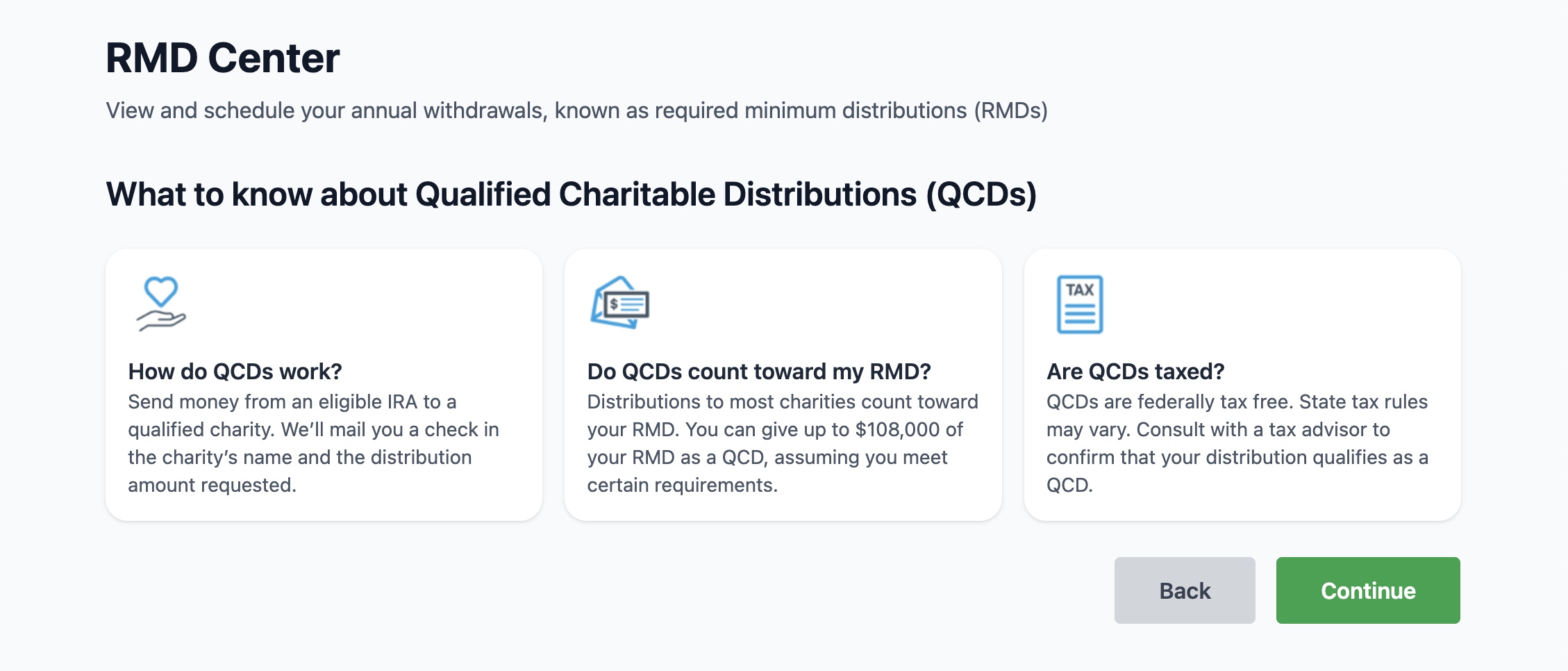
Screen 1 of 5
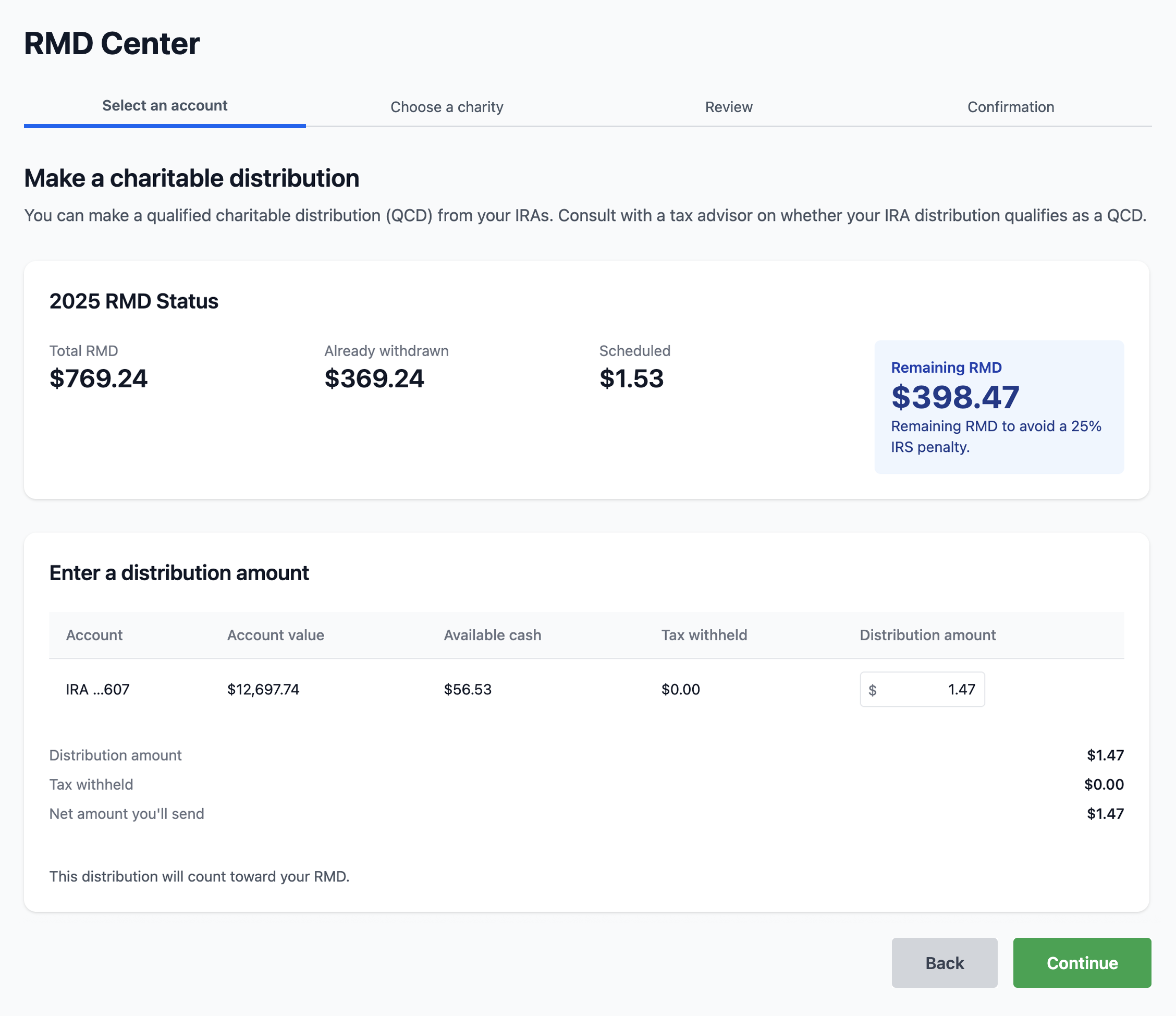
Screen 2 of 5
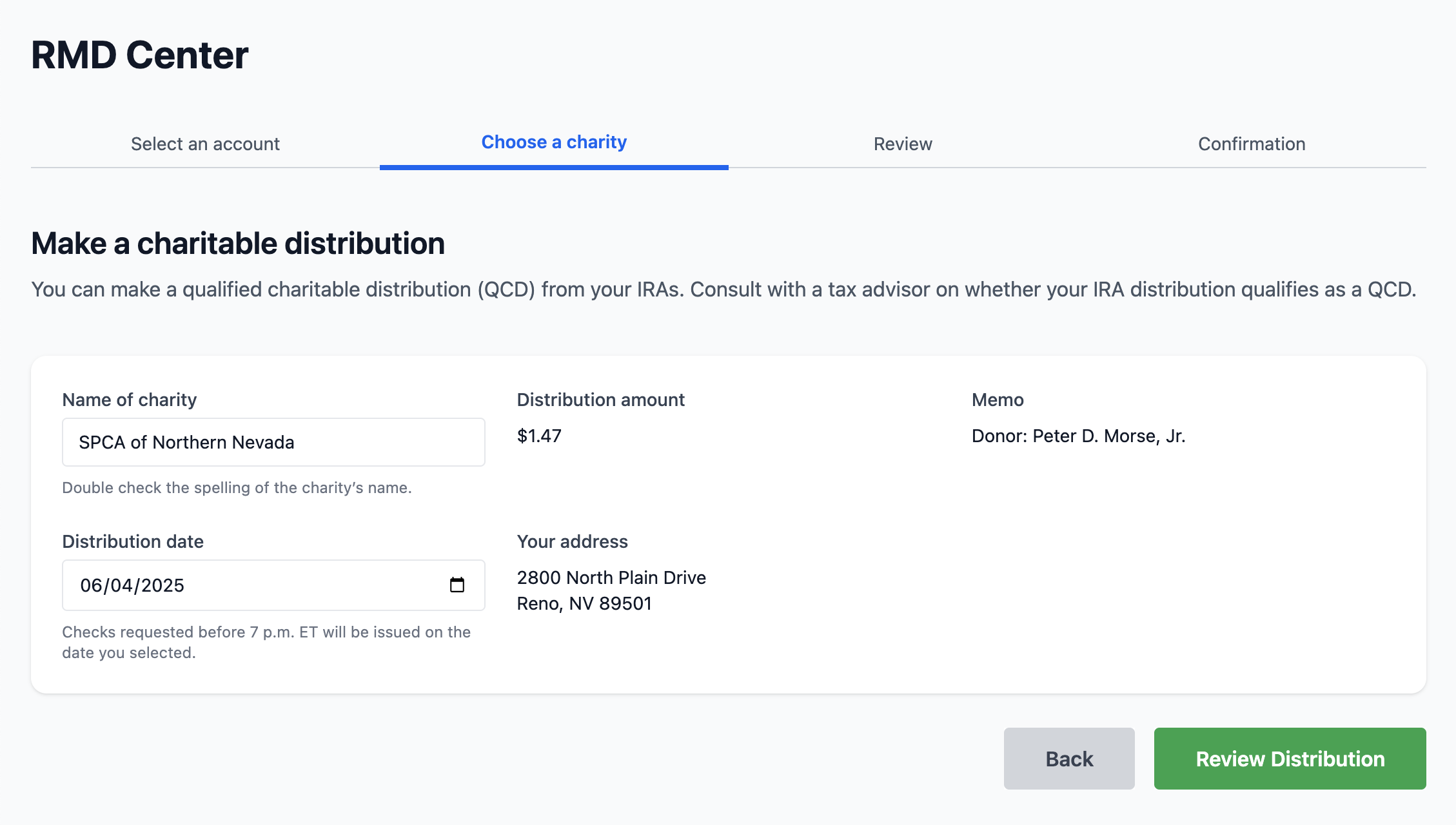
Screen 3 of 5
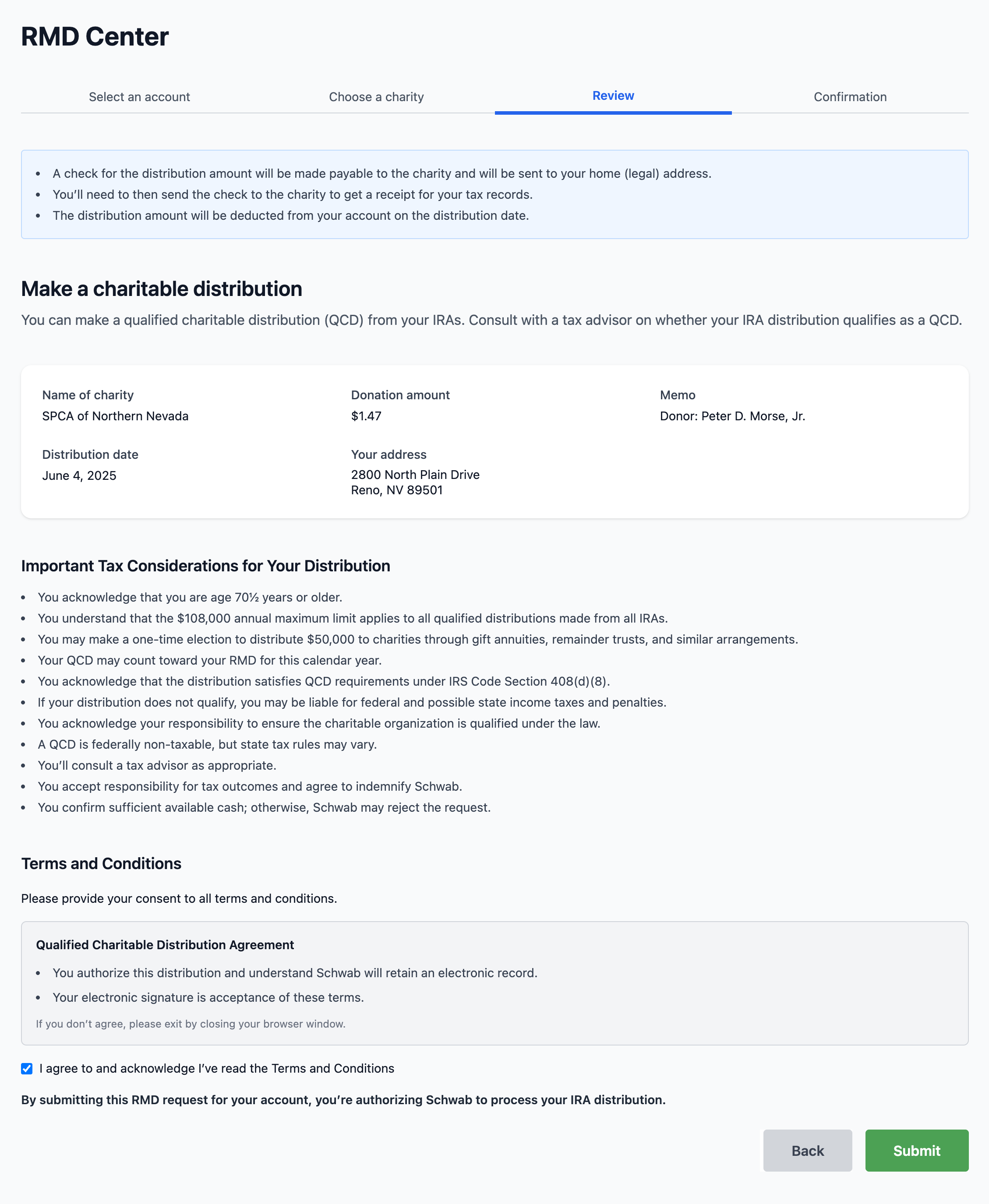
Screen 4 of 5
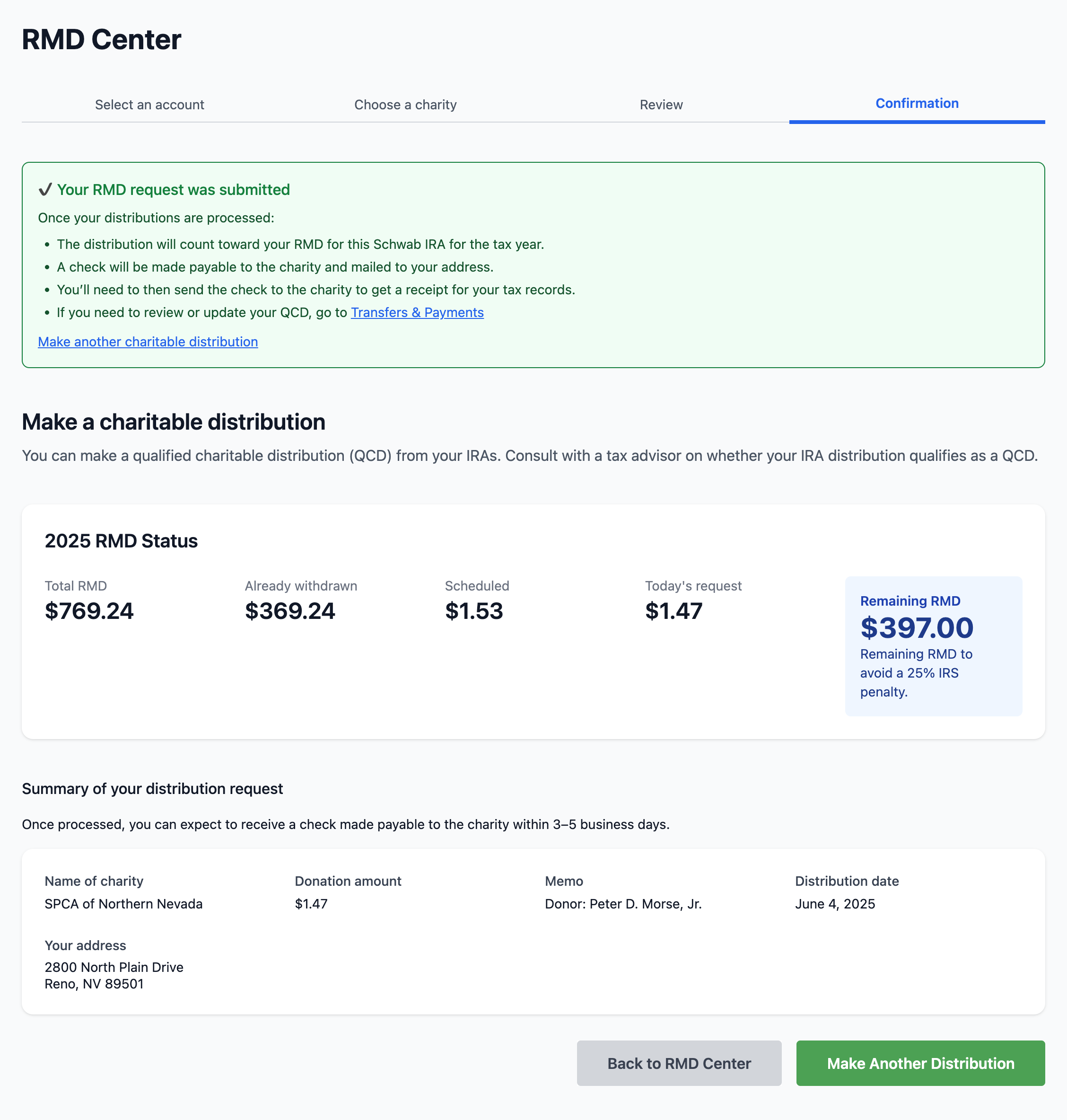
Screen 5 of 5